As recent demos of Apple Vision Pro suggest, Microsoft Excel is here to stay even in the age of spatial computing. Without judging if that is a good or bad outlook in general, scrolling through endless spreadsheets in augmented reality is probably not much more enjoyable than on today’s screens. Therefore, I want to share three ways how one can take Excel beyond its grid dimensions.
1. Beyond the grid with data types
Excel’s grid of cells provides a great user interface, because what you see is what you get (WYSIWYG), and two dimensions are usually sufficient to represent the information needed. However, as one cell can only contain one number, string, etc. it means that all relevant data must be visibly ‘stored’ across the grid. This is a particular issue when dealing with large models taking up thousands of cells. Further, converting data into a two-dimensional representation can be quite painful and result in an unnatural look and feel.
To alleviate those issues, one can use Excel data types which allow to represent arbitrarily complex data entities within one cell. For example, product data (as shown below) can be summarised in one cell. Users can quickly get an overview of the data using a customisable card view and have access to each field using the ‘dot’-syntax. Basically, it feels like object-oriented programming in Excel! 🤯

Under the hood, data types are defined using JSON. Thus, it is straightforward for developers to make use of this representation. An extract of the above example looks like this:
{
    type: "Entity",
    text: "Porsche Carrera GT",
    properties: {
      ...
      "Production": {
        type: "Array",
        elements: [
            ["Start", 2004],
            ["End", 2006],
            ["Produced", 1270]
        ],
      },
      ...
      "Curb weight": {
        type: "FormattedNumber",
        basicValue: 1380,
        numberFormat: "#,##0 \"kg\"",
        propertyMetadata: {
          sublabel: "3,042 lb",
        }
      },
    },
    layouts: {
      compact: {
        icon: "Car"
      },
      card: {
        ...
        sections: [
          {
            layout: "List",
            title: "Overview",
            properties: ["Manufacturer", "Production", "Assembly", "Designer"],
          },
          ...
        ]
      }
To get started with data types, one can experiment with Microsoft’s Script Lab add-in which is available for free.
2. Beyond static data with streaming functions
Some use cases of Excel require frequent data updates from an external source. For example: valuing financial accounts with up-to-date market prices, analysing current production output, or providing users the live status of running processes. In order to neatly integrate such updates, one can use so-called streaming functions. These allow to receive data updates without any explicit refresh by the user. One can connect them to some local logic, use web requests, and even establish WebSocket connections. Below, you see a toy example of a streaming function providing the up-to-date local time (source: Microsoft).

You can easily replicate this function by using Script Lab and paste the following code within the editor:
/**
 * Displays the current time once a second.
 * @customfunction
 * @param invocation Custom function handler
 */
export function clock(invocation: CustomFunctions.StreamingInvocation<string>): void {
  const timer = setInterval(() => {
    const time = new Date().toLocaleTimeString();
    invocation.setResult(time);
  }, 1000);

  invocation.onCanceled = () => {
    clearInterval(timer);
  };
}
3. Beyond space-time with linked data types
Excel’s static grid can already be significantly enhanced using data types and streaming functions as presented above. But what if you have complex objects with some live data - can streaming functions return data types? Unfortunately, the answer is: no (at least it did not work when I tested it). However, Excel still got you covered with linked data types, i.e., data types including live data retrieved from a specific provider. For example, information about stocks, including latest price, are provided by Refinitiv (as illustrated below). In addition to stock data, there are a few linked data types already built into many versions of Excel ready for you to try: just go to the Data tab and within the Data Types group you have multiple linked data types at hand.
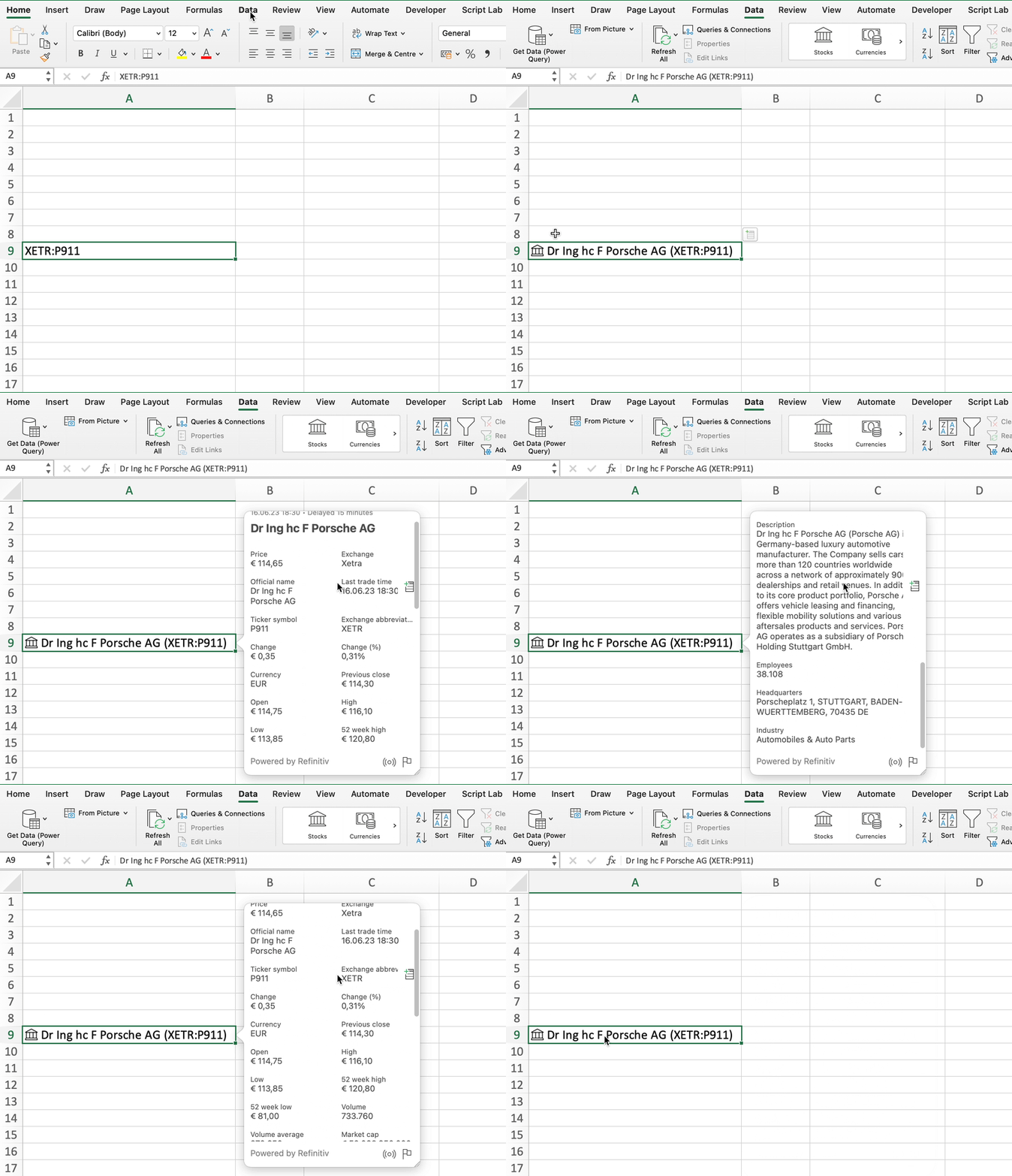
Developers can also already try linked data types as part of the Excel JavaScript API Preview. As can be seen from the documentation, linked data types will likely support multiple refresh modes (Manual, OnLoad, Periodic) allowing to balance the load created by automatic data retrieval.
Summary
Assuming that Excel is still here to stay for a while, the above approaches can help to leverage Excel as an interface users are already familiar with. Developers can easily implement those experiences allowing users to view and interact with complex/live data while avoiding to build a custom interface. Therefore, existing data can quickly be made available to users and manual import/export errors can be reduced.
Feel free to reach out to me if you are interested in trying this concept for your individual use case or want to know more about its technicalities.